NAT Gateway vs NAT Instance: Paying for the Exit
NAT Gateway for production, a $3 NAT instance for labs: one Terraform lab, three architectures and a full cost comparison, Regional NAT included.
Introduction
Every private subnet eventually wants to talk to the internet. It needs OS patches, a container image, a call to some SaaS API that swears it has 99.99% uptime. On AWS the door out is NAT, and since November 2025 you get three doors instead of two:
- the zonal NAT Gateway, polished, autoscaling and billed like a valet parking service, one per AZ, each in its own public subnet;
- the Regional NAT Gateway, the same valet, now following your cars around the whole VPC: one ID, no public subnet, billed per AZ it shows up in;
- the NAT instance, a tiny EC2 box you configure yourself, with all the charm and responsibility of a pet.
Spoiler: this is not a takedown of NAT Gateways. For production, a NAT Gateway, Regional or zonal, is the reference: AWS patches it, scales it and answers for it, and your team has one less server to secure and operate. But for labs, sandboxes and short-lived environments, paying $33 a month per door plus every GB is pure waste. That is where the pet shines, and it is exactly how I use it: spin up a lab, egress through a $3 box, destroy everything a few hours later. To draw that line fairly, we run all three side by side and compare them on usage, architecture and cost.
By the end of this article you will have, in one VPC built with Terraform:
- three private subnets, each egressing through a different door: zonal NAT Gateway, NAT instance (Amazon Linux 2023 on a
t4g.nano, configured by hand) and Regional NAT Gateway, - a test instance in each, reachable through SSM Session Manager, so you can see exactly which door it uses,
- production diagrams of all three designs across two AZs,
- a 1 AZ versus 2 AZ cost comparison you can paste into the next “why is networking so expensive?” meeting.
A short history of the NAT door
For the first years of the VPC, there was only one door: the NAT instance. AWS even shipped a ready-made image for it, the NAT AMI (amzn-ami-vpc-nat-*). On December 17, 2015, AWS launched the managed NAT Gateway, and the pet slowly went out of fashion.
The NAT AMI lingered on, built on the last Amazon Linux AMI release, 2018.03. That AMI was first scheduled to reach end of life on June 30, 2020. AWS extended it: standard support ended on December 31, 2020, then a maintenance period with only critical and important security fixes ran until December 31, 2023 (AWS News Blog). Today, the VPC documentation tells NAT AMI users to migrate to a NAT gateway, or, if a NAT instance still fits their use case better, to build their own NAT AMI from a current Amazon Linux. Step 4 of this lab does exactly that, minus the AMI baking. The latest chapter came in November 2025 with the Regional NAT Gateway: ten years later, the door finally follows you around the VPC.
Prerequisites
- An AWS account you are allowed to break. A sandbox account is ideal; production is where careers go to die.
- IAM permissions to manage VPC, EC2, Elastic IPs, IAM roles and instance profiles, plus
ssm:StartSession.AdministratorAccesson a sandbox is the lazy answer;AmazonVPCFullAccess+AmazonEC2FullAccess+IAMFullAccess+AmazonSSMFullAccessis the slightly less lazy one. - Tools installed:
- Terraform >= 1.17 (
terraform version), with a recent AWS provider 6.x: older providers do not knowavailability_mode = "regional". This article was validated with 6.72. - AWS CLI v2, recent enough for Regional NAT Gateways (
aws --version, 2.32 or later), with credentials configured (aws sts get-caller-identityreturns your account) - The Session Manager plugin for the AWS CLI (
session-manager-plugin --version)
- Terraform >= 1.17 (
- Assumed knowledge: VPC basics (subnets, route tables, internet gateway), reading Terraform, and enough Linux to not panic when you see
iptables.
Cost expectations. Following the tutorial for about two hours costs well under $0.50: two NAT Gateways (zonal and Regional) at $0.045/hour each, four t4g.nano instances at $0.0042/hour each, three public IPv4 addresses at $0.005/hour each, and a few megabytes of test traffic. Prices are us-east-1 list prices; other regions differ slightly, so check the VPC pricing page for yours. The real cost risk is forgetting the Cleanup section: a forgotten NAT Gateway quietly bills about $33 a month for doing nothing at all, and the lab has two.
Architecture overview
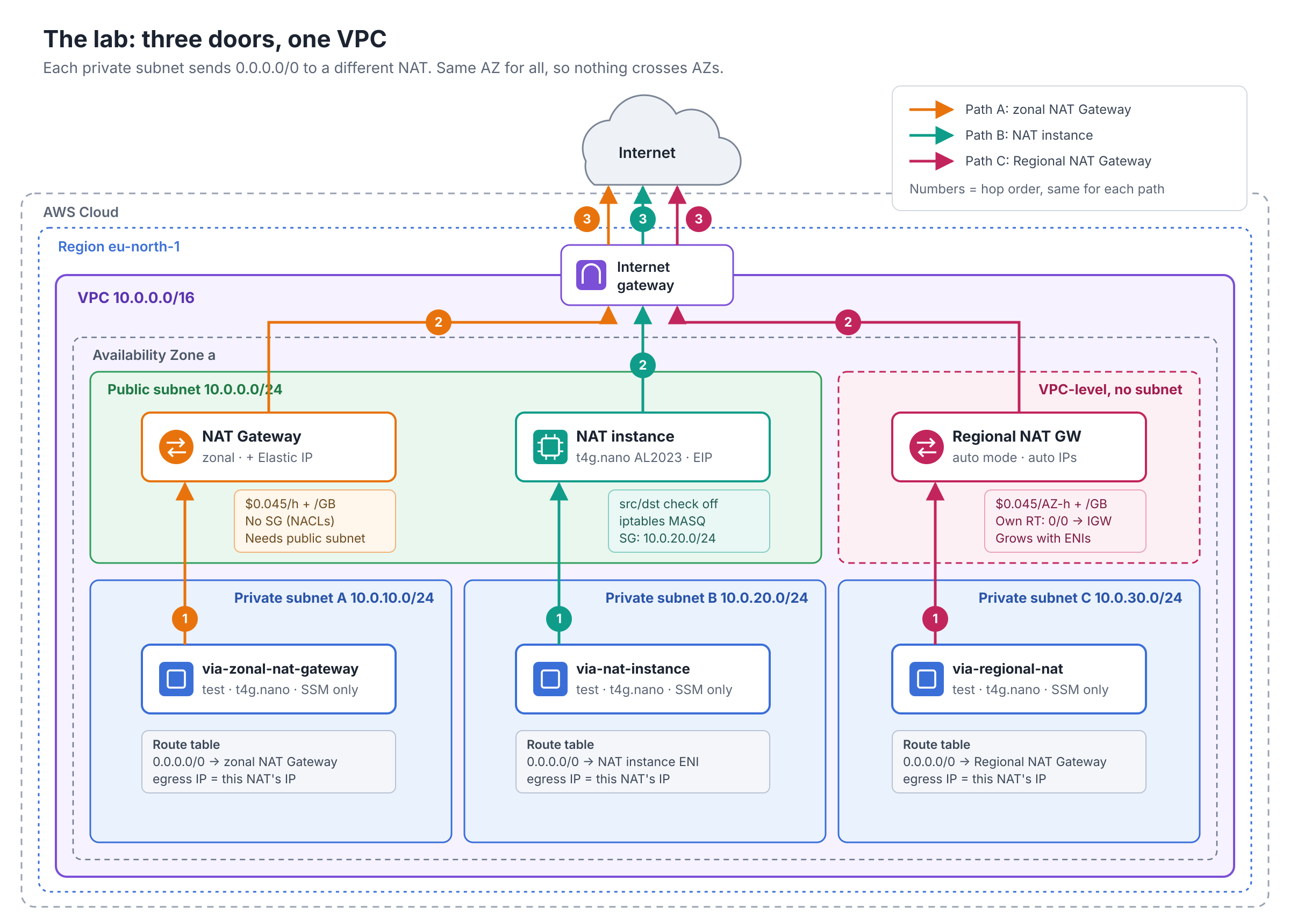
One VPC, three private subnets, three route tables that disagree about how to leave. Subnet A sends 0.0.0.0/0 to the zonal NAT Gateway (path A, orange). Subnet B sends it to the network interface of the NAT instance (path B, teal). Subnet C sends it to the Regional NAT Gateway (path C, magenta). All three doors hand traffic to the same internet gateway.
A few things the official diagrams tend to skip:
- Only two of the three doors live in a subnet. The zonal NAT Gateway and the NAT instance sit in the public subnet. The Regional NAT Gateway is a VPC-level resource with its own route table (
0.0.0.0/0to the internet gateway); you never pick a subnet for it. - The NAT Gateways are hidden managed ENIs, the NAT instance is just EC2. That explains most of what follows: the NAT instance has a security group, a source/destination check, an OS to patch and a bandwidth ceiling. Both gateways have none of those, and a per-GB meter instead.
- Everything sits in one AZ on purpose. It keeps cross-AZ transfer out of the comparison, and it also means the Regional NAT Gateway only expands into that one AZ.
- The test instances have no inbound rules at all. We reach them with SSM Session Manager, which only works if their NAT does, so a successful login already proves egress.
From lab to production: three designs across two AZs
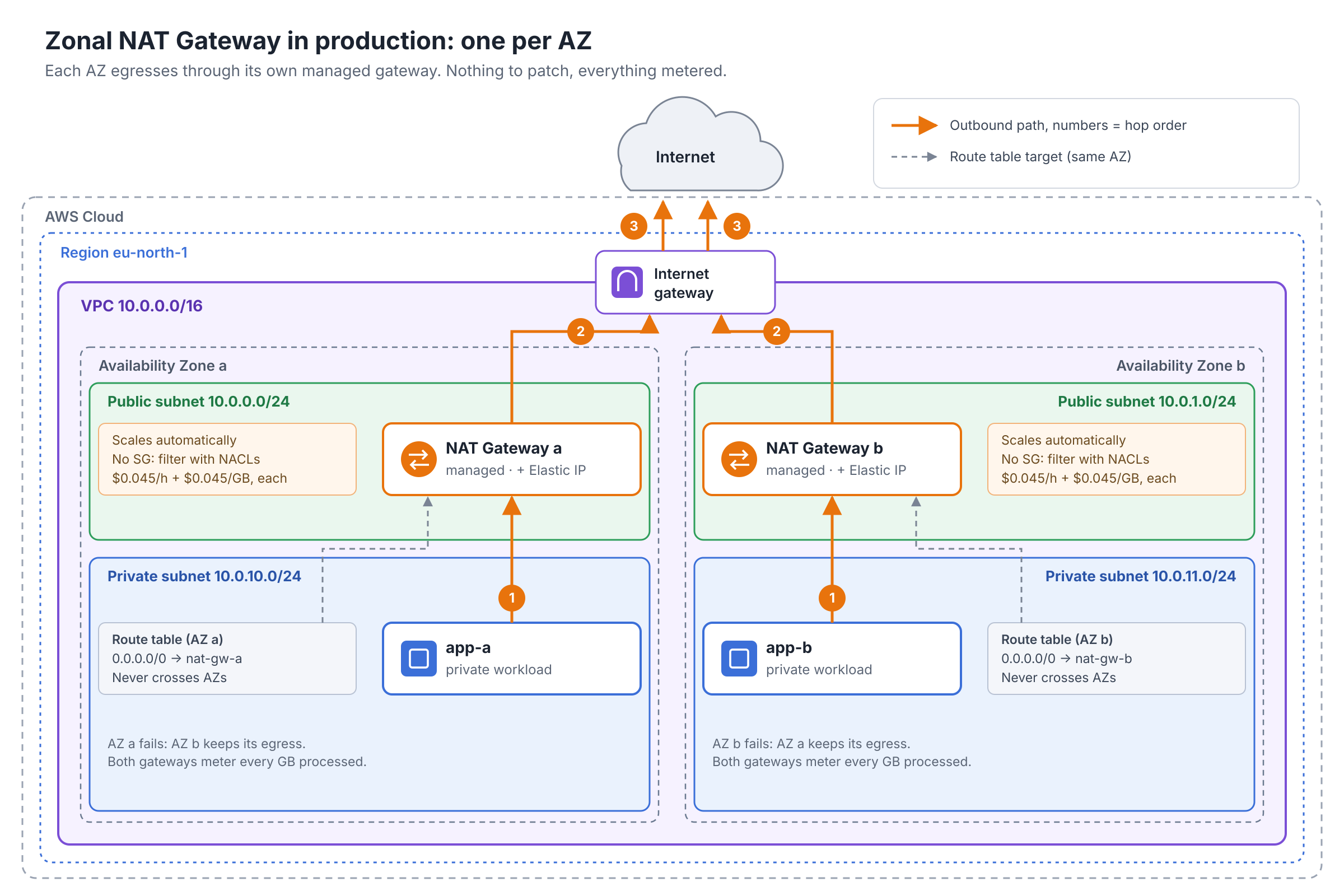
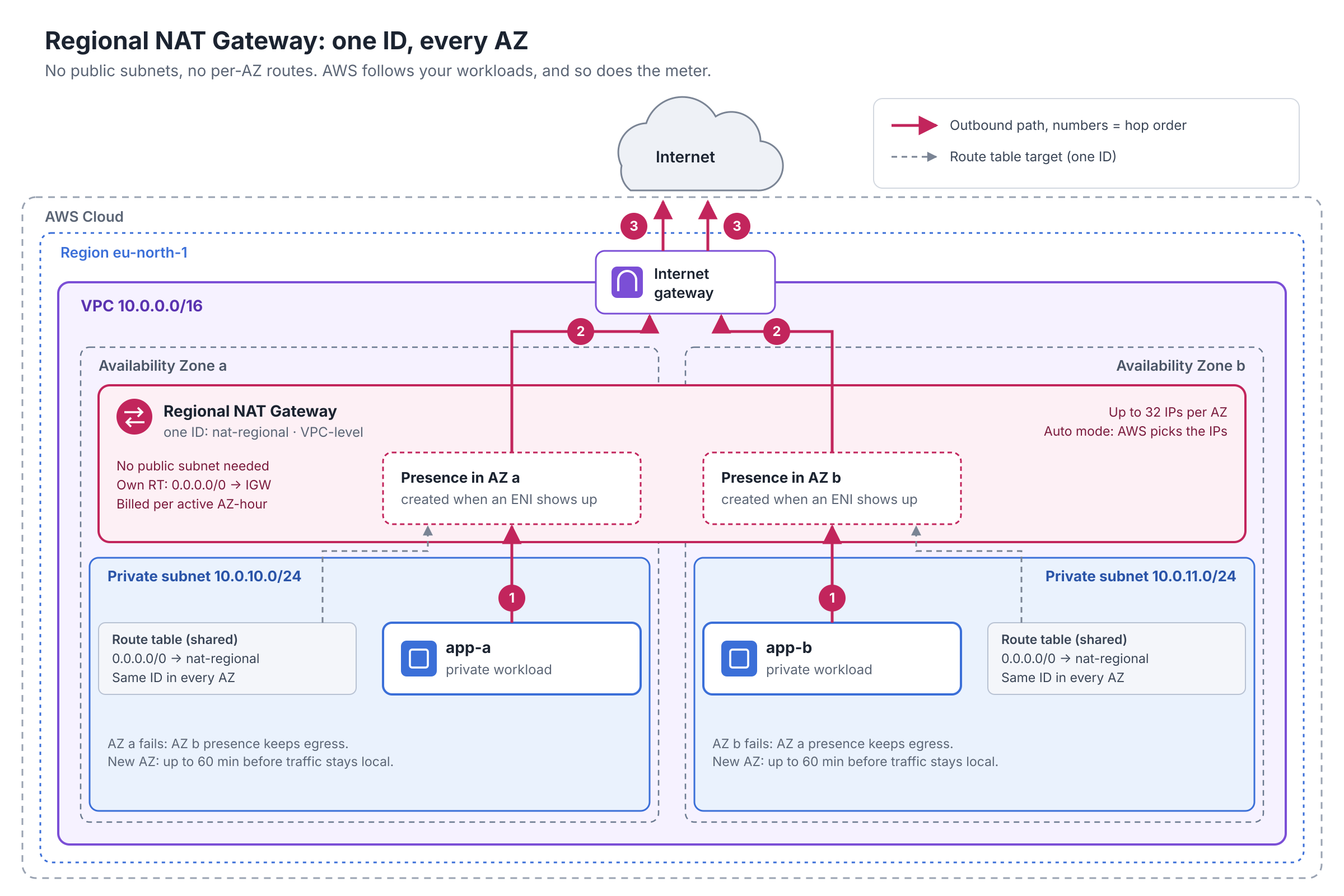
In production, the zonal NAT Gateway and the NAT instance share the same shape: one NAT per AZ, a public subnet per AZ, and a route table per AZ pointing at its local NAT. The Regional NAT Gateway removes the public subnets and the per-AZ plumbing: one ID in every route table, and AWS keeps traffic in its own AZ for you.
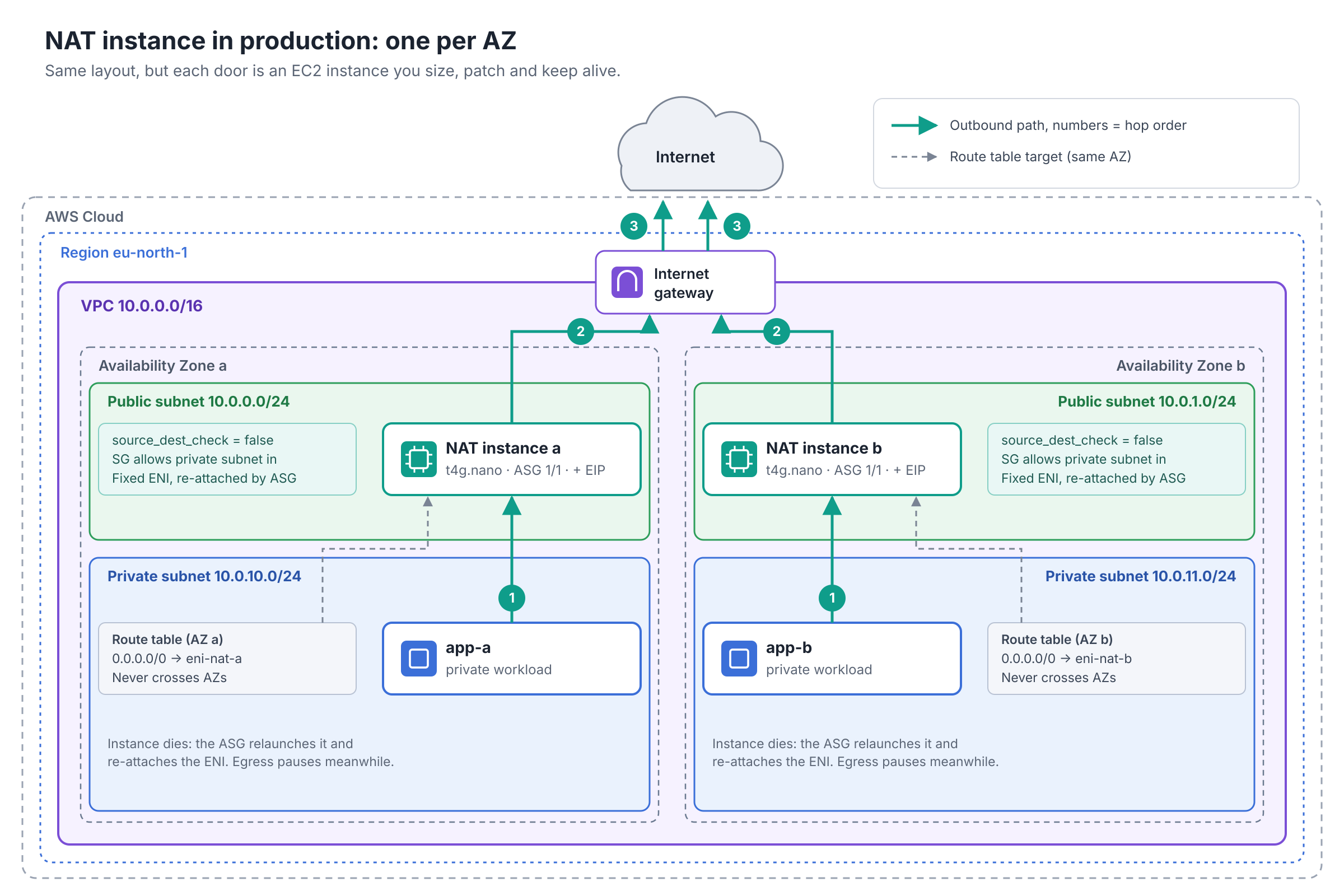
[image: Production NAT instance: one EC2 NAT instance per AZ in an Auto Scaling group of 1, each private subnet routes to its own AZ’s instance ENI]
| Zonal NAT Gateway | Regional NAT Gateway | NAT instance | |
|---|---|---|---|
| Who runs it | AWS | AWS | You |
| Where it lives | A public subnet, one per AZ | The VPC itself, no subnet | A public subnet, one per AZ |
| Route tables | One per AZ, each to its local gateway | One shared, a single ID | One per AZ, each to its local ENI |
| New AZ | Create a gateway, an EIP, a route | Automatic, up to 60 minutes to go local | Launch an instance, update the route |
| Availability | Redundant inside its AZ | Follows workloads across AZs | One instance per AZ; minutes of lost egress on failure |
| Bandwidth | Scales automatically | 5 Gbps per AZ, scaling to 100 Gbps | Capped by instance type: t4g.nano bursts to 5 Gbps |
| Public IPs | Up to 8 per gateway, yours | Up to 32 per AZ; auto mode picks them | One EIP per instance, yours |
| Security group | None, filter with NACLs | None, filter with NACLs | Required, must allow every routed subnet |
| Patching | Nothing to patch | Nothing to patch | OS updates; every reboot is an egress outage |
| Pricing model | $0.045/hour + $0.045/GB per gateway | $0.045 per active AZ-hour + $0.045/GB | Instance hours only, no per-GB fee |
| Private NAT | Supported | Not supported | Possible, you build it |
| Pick it when | Production that needs private NAT or fixed per-AZ IPs | Production reference for internet egress | Labs, sandboxes and short-lived non-production |
Step-by-step deployment
The full lab lives on GitHub: jimmy-ao/aws_nat-gateway-vs-nat-instance. Clone it, read the four snippets below that actually matter, and deploy. The rest is VPC boilerplate you have written a hundred times, and it is all in the repo if you miss it.
Phase 1: Setup
Step 1. Clone the repo.
git clone https://github.com/jimmy-ao/aws_nat-gateway-vs-nat-instance.git
cd aws_nat-gateway-vs-nat-instance
Step 2. Pick a region (optional). The lab defaults to eu-north-1 (Stockholm). Change it without touching a file:
export TF_VAR_region=eu-west-1
Every resource follows one naming convention, <env>-<type>-``<region or AZ>-<descriptor>, plus Service and Purpose tags. With the defaults, the zonal NAT Gateway’s Elastic IP is named l-eip-eun1-znat, and Purpose tells you at a glance which of the three doors a resource belongs to: zonalNatGateway, natInstance, regionalNatGateway or natShowdown. Handy for grouping costs by door in Cost Explorer, once you have activated them as cost allocation tags in the Billing console.
Here is what you just cloned:
| File | What it creates |
|---|---|
network.tf | VPC, locked-down default security group, internet gateway, public subnet and its route table |
zonal-nat-gateway.tf | Zonal NAT Gateway and its Elastic IP, private subnet A and its route table |
nat-instance.tf | NAT instance on AL2023 arm64, its security group and Elastic IP, private subnet B and its route table |
regional-nat-gateway.tf | Regional NAT Gateway, private subnet C and its route table |
test-instances.tf | SSM role, HTTPS-only security group, one test instance per private subnet |
outputs.tf | NAT IDs, public IPs and test instance IDs |
scripts/check-egress.sh | Asks each test instance for its public IP and checks it against its NAT |
Phase 2: The lines that matter
Step 3. The zonal NAT Gateway. The heart of zonal-nat-gateway.tf. Two resources, $33 a month. Enjoy the efficiency.
resource "aws_eip" "zonal_nat_gateway" {
  domain = "vpc"

  tags = {
    Name    = "${local.env}-eip-${local.reg}-znat"
    Service = "elasticIP"
    Purpose = "zonalNatGateway"
  }
}

resource "aws_nat_gateway" "zonal" {
  allocation_id = aws_eip.zonal_nat_gateway.id
  subnet_id     = aws_subnet.public.id

  tags = {
    Name    = "${local.env}-ngtw-${local.az_naming}-zonal"
    Service = "natGateway"
    Purpose = "zonalNatGateway"
  }

  depends_on = [aws_internet_gateway.main]
}
Step 4. The NAT instance. The heart of nat-instance.tf: a Graviton t4g.nano on stock Amazon Linux 2023. We skip the retired AWS NAT AMI and configure forwarding ourselves in about fifteen lines of user data.
resource "aws_instance" "nat_instance" {
  ami           = data.aws_ssm_parameter.al2023_arm64.value
  instance_type = "t4g.nano"
  subnet_id     = aws_subnet.public.id
  # security group, instance profile, IMDSv2 and encrypted root volume: see the repo

  # The single most important line in this file. See "Gotchas".
  source_dest_check = false

  user_data_replace_on_change = true
  user_data                   = <<-EOF
    #!/bin/bash
    set -euxo pipefail

    # 1. Let the kernel forward packets between interfaces
    echo "net.ipv4.ip_forward = 1" > /etc/sysctl.d/90-nat.conf
    sysctl -p /etc/sysctl.d/90-nat.conf

    # 2. AL2023 ships without iptables, and the instance may boot before its Elastic IP
    #    is attached: retry for 5 minutes instead of dying on the first try (see "Gotchas")
    n=0
    until dnf install -y iptables-services; do
      n=$((n + 1))
      [ "$n" -lt 30 ] || exit 1
      sleep 10
    done

    # 3. Masquerade private subnet B traffic leaving the primary interface (ens5 on AL2023, not eth0)
    IFACE=$(ip -o -4 route show to default | awk '{print $5}')
    iptables -t nat -A POSTROUTING -o "$IFACE" -s ${aws_subnet.private_inat.cidr_block} -j MASQUERADE

    # 4. Persist ONLY our rules, then start the service (order matters, see "Gotchas")
    iptables-save > /etc/sysconfig/iptables
    systemctl enable --now iptables
  EOF
}
Its security group accepts everything from private subnet B and nothing else. Unlike a NAT Gateway, a NAT instance needs one, and forgetting it is a classic.
Step 5. The Regional NAT Gateway. Count what is missing compared with Step 3: no subnet, no Elastic IP, no public subnet at all. Just a VPC ID and one magic argument. In automatic mode AWS allocates the public IPs and expands the gateway into every AZ where it sees network interfaces.
resource "aws_nat_gateway" "regional" {
  availability_mode = "regional"
  vpc_id            = aws_vpc.main.id

  tags = {
    Name    = "${local.env}-ngtw-${local.reg}-regional"
    Service = "natGateway"
    Purpose = "regionalNatGateway"
  }

  # A Regional NAT Gateway still needs an internet gateway on the VPC.
  depends_on = [aws_internet_gateway.main]
}
Step 6. Three routes, three doors. The only real difference between subnets A, B and C is the target of their default route:
# Subnet A: zonal NAT Gateway
route {
  cidr_block     = "0.0.0.0/0"
  nat_gateway_id = aws_nat_gateway.zonal.id
}

# Subnet B: the NAT instance's network interface
route {
  cidr_block           = "0.0.0.0/0"
  network_interface_id = aws_instance.nat_instance.primary_network_interface_id
}

# Subnet C: Regional NAT Gateway, same argument as A
route {
  cidr_block     = "0.0.0.0/0"
  nat_gateway_id = aws_nat_gateway.regional.id
}
Route tables do not care that the ENI in subnet B belongs to a $3 box. In a multi-AZ VPC, every private route table would point at the same Regional ID, while zonal gateways and NAT instances need one route table per AZ.
Phase 3: Deploy
Step 7. Initialise and validate.
terraform init
terraform validate
Expected output ends with:
Success! The configuration is valid.
Step 8. Plan, and read the plan.
terraform plan -out=tfplan
Plan: 28 to add, 0 to change, 0 to destroy.
Step 9. Apply.
terraform apply tfplan
Both NAT Gateways are the slowest resources, typically one to two minutes in Pending before they turn Available. The NAT instance is ready in under a minute, which is the only race it will ever win against a managed service. Expected output (your IDs and IPs will differ):
Apply complete! Resources: 28 added, 0 changed, 0 destroyed.

Outputs:

nat_gateway_id = "nat-0a1b2c3d4e5f67890"
nat_gateway_public_ip = "13.48.10.21"
nat_instance_id = "i-0123456789abcdef0"
nat_instance_public_ip = "13.51.200.7"
regional_nat_gateway_id = "nat-0f9e8d7c6b5a43210"
regional_nat_gateway_public_ips = {
  "eu-north-1a" = "13.60.44.9"
}
test_instance_ids = {
  "via-zonal-nat-gateway" = "i-0aaaaaaaaaaaaaaa1"
  "via-nat-instance" = "i-0bbbbbbbbbbbbbbb2"
  "via-regional-nat" = "i-0ccccccccccccccc3"
}
If regional_nat_gateway_public_ips comes back empty, the Regional NAT Gateway has not finished expanding yet; run terraform apply -refresh-only and terraform output again in a few minutes.
Verification and testing
The test passes when each private instance reports the public IP of its own NAT. Four checks, from “is it alive” to “is it actually the door I paid for”.
The one-command version. The repo ships a script that asks each test instance for its public IP through SSM Run Command and compares it with its NAT. It needs the ssm:SendCommand permission and jq:
./scripts/check-egress.sh
SUBNET                 EGRESS IP        EXPECTED         RESULT
via-zonal-nat-gateway  13.48.10.21      13.48.10.21      OK
via-nat-instance       13.51.200.7      13.51.200.7      OK
via-regional-nat       13.60.44.9       13.60.44.9       OK
Three OK lines and you are done. If you prefer to see it with your own eyes, or one line says MISMATCH, here is the manual tour.
1. All three test instances registered with SSM. If an instance is missing here, its NAT is broken: no egress, no SSM agent check-in.
aws ssm describe-instance-information \
  --query "InstanceInformationList[].{Id:InstanceId,Ping:PingStatus}" --output table
-----------------------------------------
|      DescribeInstanceInformation      |
+----------------------+----------------+
|          Id          |     Ping       |
+----------------------+----------------+
|  i-0123456789abcdef0 |  Online        |
|  i-0aaaaaaaaaaaaaaa1 |  Online        |
|  i-0bbbbbbbbbbbbbbb2 |  Online        |
|  i-0ccccccccccccccc3 |  Online        |
+----------------------+----------------+
Four lines, because the NAT instance carries the SSM profile too (handy for debugging it).
2. Each subnet leaves through its own door. Open a session on each test instance and ask the internet who is calling.
aws ssm start-session --target $(terraform output -json test_instance_ids | jq -r '."via-zonal-nat-gateway"')
sh-5.2$ curl -s https://checkip.amazonaws.com
13.48.10.21
That is nat_gateway_public_ip. Exit, then repeat with via-nat-instance:
sh-5.2$ curl -s https://checkip.amazonaws.com
13.51.200.7
That is nat_instance_public_ip. Exit, then repeat one last time with via-regional-nat:
sh-5.2$ curl -s https://checkip.amazonaws.com
13.60.44.9
That is the Regional NAT Gateway’s address for your AZ, from regional_nat_gateway_public_ips. Three subnets, three doors, three IPs. If two of them match, a route table association is wrong.
2b. The Regional NAT Gateway really is regional. Ask AWS how it sees the gateway:
aws ec2 describe-nat-gateways --nat-gateway-ids $(terraform output -raw regional_nat_gateway_id) \
  --query "NatGateways[0].{Mode:AvailabilityMode,State:State,Zones:RegionalNatGatewayAddresses[].AvailabilityZone}"
{
    "Mode": "regional",
    "State": "available",
    "Zones": [
        "eu-north-1a"
    ]
}
One zone only, because every network interface in this lab lives in one AZ. Launch something in a second AZ and, up to an hour later, a second entry appears. No Terraform change, no route change, and a second AZ-hour on your bill. The field names come from the describe-nat-gateways output of a recent CLI; if your query returns null, drop --query and look at the raw JSON.
3. The NAT instance is really doing the translating. From a session on the NAT instance, look at the masquerade rule counters. They should grow every time you run the curl above.
sh-5.2$ sudo iptables -t nat -L POSTROUTING -n -v
Chain POSTROUTING (policy ACCEPT 0 packets, 0 bytes)
 pkts bytes target     prot opt in     out     source               destination
   42  2856 MASQUERADE  all  --  *      ens5    10.0.20.0/24         0.0.0.0/0
Also confirm forwarding survived boot: sysctl net.ipv4.ip_forward must print = 1.
4. The NAT Gateway is metering you, as promised. CloudWatch publishes NAT Gateway metrics under AWS/NATGateway; BytesOutToDestination is the number that ends up on your bill.
aws cloudwatch get-metric-statistics \
  --namespace AWS/NATGateway --metric-name BytesOutToDestination \
  --dimensions Name=NatGatewayId,Value=$(terraform output -raw nat_gateway_id) \
  --start-time $(date -u -d '-30 min' +%FT%TZ) --end-time $(date -u +%FT%TZ) \
  --period 300 --statistics Sum --output table
Run it again with regional_nat_gateway_id for the Regional gateway; it publishes in the same namespace, and adding an AvailabilityZone dimension splits the numbers per AZ. Non-zero Sum values mean traffic is flowing, and being counted at $0.045 per GB, through either gateway. The NAT instance has no equivalent per-GB meter, which is precisely its appeal.
Gotchas and lessons learned
The NAT instance is cheap in dollars and expensive in footguns. Both NAT Gateways are the reverse, and the Regional one adds a few surprises of its own. Here is the bill for all three.
What it really costs
Total monthly bill, internet egress included, for the three solutions in 1 AZ and 2 AZ designs. Read across a row to see how each option scales with traffic.
| Design | Idle | 100 GB | 1 TB | 5 TB | 10 TB |
|---|---|---|---|---|---|
| Zonal NAT Gateway, 1 AZ | $36.50 | $50.00 | $171.50 | $711.50 | $1,386.50 |
| Zonal NAT Gateway, 2 AZ, one shared gateway | $36.50 | $51.00 | $181.50 | $761.50 | $1,486.50 |
| Zonal NAT Gateway, 2 AZ, one per AZ | $73.00 | $86.50 | $208.00 | $748.00 | $1,423.00 |
| Regional NAT Gateway, 1 AZ | $36.50 | $50.00 | $171.50 | $711.50 | $1,386.50 |
| Regional NAT Gateway, 2 AZ | $73.00 | $86.50 | $208.00 | $748.00 | $1,423.00 |
| NAT instance, 1 AZ | $7.36 | $16.36 | $97.36 | $466.55 | $916.55 |
| NAT instance, 2 AZ, one shared instance | $7.36 | $17.36 | $107.36 | $516.55 | $1,016.55 |
| NAT instance, 2 AZ, one per AZ | $14.71 | $23.71 | $104.71 | $483.11 | $933.11 |
How the numbers are built (us-east-1 list prices, 730 hours, 1 TB = 1,000 GB):
- Zonal NAT Gateway: $0.045/hour + $0.045/GB processed per gateway (VPC pricing).
- Regional NAT Gateway: $0.045 per hour for each AZ it is active in, + $0.045/GB (VPC pricing). Active in 2 AZs, it costs exactly what two zonal gateways cost. In automatic mode it also holds at least one public IPv4 per AZ.
- NAT instance:
t4g.nanoat $0.0042/hour up to 1 TB per instance,t4g.smallat $0.0168/hour above that, because you size for peaks, not averages (t4g.small specs). Plus an 8 GB gp3 root volume (about $0.64). - All three: one public IPv4 per NAT or per AZ at $0.005/hour, and internet egress at $0.09/GB. Egress is the same through every door: $9, $90, $450 and $900 for the four traffic levels. The 100 GB monthly free tier is ignored.
- Shared NAT across 2 AZs: half the traffic crosses AZs, billed $0.01/GB in each direction (Last Week in AWS), which adds $0.01 per GB of total traffic. A Regional NAT Gateway in automatic mode has no shared variant: it goes wherever your workloads are.
What the table says, once you stop crying:
- Regional costs exactly what zonal done right costs. Same hourly rate per AZ, same per-GB rate, no premium for the convenience. Zonal is only cheaper in the shared-gateway design, which is also the fragile one.
- “One shared NAT to save money” stops saving money. A shared zonal gateway is cheaper only below about 3.65 TB a month; above that, the cross-AZ charge exceeds the second gateway’s hourly fee. You end up paying more for a design where one AZ outage takes out egress for both. For NAT instances, the break-even is about 740 GB.
- The NAT itself, not the internet, is the markup. At 1 TB across 2 AZs, the doors alone cost $118.00 for either kind of NAT Gateway versus $14.71 for NAT instances, about 8 times more. At 10 TB, egress dominates and the gap shrinks to about 1.5 times in total.
- High availability is cheap insurance for gateways, almost free for instances. Going from 1 AZ to 2 AZs adds $36.50 a month with either NAT Gateway, and $7.36 with NAT instances.
- Regional bills the AZs you have, not the AZs you planned. It expands into any AZ where a network interface appears, so one stray resource in a third AZ adds about $36.50 a month without a single line of Terraform changing.
The footguns
- Source/destination check. EC2 drops any packet whose source or destination is not the instance itself. A NAT’s whole job is forwarding other people’s packets, so leave
source_dest_check = trueand you get a NAT that silently drops everything. No error, no log, justcurlhanging forever. It is the first thing to check, always. - The
iptables-servicesdefault config sabotages you. Its stock rules file ends theFORWARDchain with aREJECT. If you start the service first and add your masquerade rule afterwards, NAT works for the curious ICMP packet and nothing else. That is why the user data saves only our own rules and starts the service last. - It is
ens5, noteth0. Half the NAT-instance tutorials on the internet hard-code-o eth0. Amazon Linux 2023 on Nitro names the interfaceens5, so the masquerade rule matches nothing. Detect the default-route interface instead of trusting a blog post (yes, including this one). - Stock AL2023 has no iptables, and the NAT may boot offline.
iptables-servicesis not on the image, so the user data installs it withdnf. But the instance can start before its Elastic IP is attached, with no public IP and no way out, and underset -eone failed install ends the script before the masquerade rule. The NAT instance looks perfectly healthy; the subnet behind it gets nothing. Retry the install, and when a door goes quiet, read/var/log/cloud-init-output.logon the NAT instance first. - The official AWS NAT AMI is a museum piece. AWS’s own NAT AMI is built on Amazon Linux AMI 2018.03, out of standard support since December 31, 2020 and end of life since December 31, 2023, and it has no ARM build, so it cannot even run on the cheap Graviton types (source). Use stock AL2023 like we did, or fck-nat, a community AMI built for exactly this.
- The security group only exists on one side. A NAT Gateway has no security group: you filter with NACLs or the clients’ own groups. A NAT instance is an EC2 instance, so its SG must explicitly allow inbound traffic from every subnet routed through it. Add a third private subnet, forget the SG, enjoy the silence.
- The $0.045 per GB is the real bill, not the hourly fee. That rate applies to every GB processed, on top of normal data transfer. The classic surprise is S3 or ECR pulls going through NAT. Add an S3 gateway endpoint first: gateway endpoints for S3 and DynamoDB cost nothing per hour or per GB.
- One NAT for three AZs is a false economy. Sharing a single NAT Gateway across AZs saves hourly fees but adds cross-AZ transfer charges and makes one AZ a single point of failure for the others. AWS’s answer since November 2025 is the Regional NAT Gateway: one gateway ID for the whole VPC, no public subnet required, billed per AZ it is active in (pricing). It does not support private NAT, so keep zonal gateways for that case.
- The NAT instance is a pet, with all that implies. Patching means rebooting, and rebooting means an egress outage for every subnet behind it. There is no automatic failover: if the instance or its AZ dies, so does egress. Mitigate with an Auto Scaling group of one (plus a script that repoints the route), or fck-nat’s HA mode; fck-nat’s own docs still recommend NAT Gateway if you need five nines.
- Bandwidth is burstable, like your patience. A
t4g.nanobursts up to 5 Gbps (fck-nat), but small instances have a much lower baseline and spend network credits to burst. Fine for patches and API calls, painful for a nightly multi-terabyte sync. A NAT Gateway just scales. - The chicken-and-egg debugging problem. When the NAT instance is broken, the test instance behind it cannot reach SSM, so you cannot get in to debug. Debug from the NAT instance itself (it sits in the public subnet and has the SSM profile), or use the EC2 serial console. Interface endpoints for SSM remove the dependency entirely, for about $0.01/hour per AZ each.
Regional NAT Gateway specials
The new door removes a lot of plumbing, and adds a few new ways to be surprised:
- It expands on any network interface. The gateway detects ENIs per AZ and expands there (AWS docs), regardless of subnet type. An ENI in a public subnet counts too (re:Post test). Every new AZ is a new AZ-hour on the bill.
- Expansion is not instant. A new AZ can take up to 60 minutes to get its local presence; until then its traffic is processed in another AZ, with cross-AZ charges (AWS docs). Fine for a scale-out, awkward for a latency-sensitive launch.
- Automatic mode picks and changes your IPs. It adds addresses as connections grow, up to 32 per AZ, so a partner’s IP allowlist will not stay accurate. If someone allowlists your egress IPs, use manual mode with your own Elastic IPs.
- No private NAT, and no in-place conversion. Private NAT still needs zonal gateways. Moving from zonal to regional means a new gateway and a route switch, which resets existing connections, so plan a maintenance window (AWS docs).
- It still needs an internet gateway. No public subnet does not mean no IGW: creation fails without one, and you cannot detach the IGW while a Regional NAT Gateway exists (AWS Korea blog). There is also a limit of 5 Regional NAT Gateways per VPC.
So, which door?
- Production: a NAT Gateway, Regional by default. AWS owns patching, scaling, availability and the security of the device itself. There is no OS to harden, no IAM role on a box sitting in a public subnet, a much smaller attack surface, and nothing for the team to operate at 3 a.m. Pick zonal instead when you need private NAT or fixed per-AZ IPs under your control. The $60 to $100 a month the table shows over NAT instances is the price of that responsibility moving to AWS, and for production it is usually cheap.
- Labs, sandboxes, short-lived non-production: a NAT instance. A
t4g.nanocosts about $3 a month, nothing per GB, and disappears withterraform destroy. Perfect for labs that live a few hours, demo environments and dev accounts where a reboot is a shrug, not an incident. - The grey zone: long-lived dev or staging. Do the math with the table above, but apply one rule: the day someone’s on-call depends on it, it is production, and it gets a NAT Gateway.
The Well-Architected lens
Run the choice through the six pillars of the AWS Well-Architected Framework and five of them point to the NAT Gateway. The sixth, cost, is exactly why the NAT instance wins in labs.
| Pillar | NAT Gateway (zonal or Regional) | NAT instance | Points to |
|---|---|---|---|
| Operational excellence | Managed: no patching, sizing or OS monitoring | One more server to run, patch and fail over | NAT Gateway |
| Security | AWS secures the device; smaller attack surface | You own OS hardening, IMDS, the IAM role and a public IP | NAT Gateway |
| Reliability | Redundant in its AZ; one per AZ or Regional removes single points of failure | Single point of failure unless you build ASG failover | NAT Gateway |
| Performance efficiency | Scales automatically to very high bandwidth | Bounded by instance size and burst credits | NAT Gateway |
| Cost optimization | $0.045/hour + $0.045/GB, worth it once people’s time counts | About $3 a month, nothing per GB, destroyed with the lab | Instance for labs, Gateway for production |
| Sustainability | Shared managed capacity, no idle boxes | A small instance, often idle between labs | Slight edge to NAT Gateway |
Two nuances keep this honest. First, the framework gives a strong default, not a hard rule: a NAT instance can still make sense in production for custom egress proxying or very steady, very high throughput, if the team accepts the operational load. Second, a NAT Gateway shrinks the attack surface but inspects nothing. If production needs egress control, add AWS Network Firewall or Route 53 Resolver DNS Firewall, plus VPC Flow Logs, whichever door you choose.
Cleanup
One command, one confirmation, and both NAT Gateways stop billing you for existing.
terraform destroy
Expected output:
Destroy complete! Resources: 28 destroyed.
Both NAT Gateways take a minute or two in Deleting, and the internet gateway and VPC cannot go until they are gone; Terraform handles the ordering. If you ever click-ops a Regional NAT Gateway, note that deleting the VPC does not delete it for you. Then double-check that nothing tagged Project=nat-showdown survived, starting with the expensive suspects:
aws ec2 describe-nat-gateways --filter Name=tag:Project,Values=nat-showdown \
  --query "NatGateways[?State!='deleted'].NatGatewayId"
aws ec2 describe-addresses --filters Name=tag:Project,Values=nat-showdown \
  --query "Addresses[].PublicIp"
Both should return []. Deleted NAT Gateways stay visible in deleted state for a while, which is why the query filters them out. A leftover Elastic IP keeps billing $0.005/hour, attached or not.
Conclusion and next steps
You built three doors out of the same VPC and walked through all of them. The zonal NAT Gateway asks for public subnets and per-AZ plumbing, then bills every hour and every GB. The Regional NAT Gateway bills exactly the same, deletes the plumbing, and follows your workloads around, sometimes into AZs you forgot about. The NAT instance costs about the price of a coffee per month, and in return asks for a security group, one sysctl, one iptables rule and a plan for when it reboots.
The verdict: in production, pay for the NAT Gateway. The money buys you a door that AWS patches, scales and secures, and a team that never has to babysit iptables. In labs and sandboxes, keep the money: a NAT instance does the job for the price of a coffee, and a short-lived lab rarely lives long enough to need patching. Either way, add VPC endpoints everywhere, because the cheapest GB is the one that never touches any NAT.
To go further:
- Shrink the NAT bill before choosing a NAT: add an S3 gateway endpoint and interface endpoints for ECR, CloudWatch Logs and SSM, then re-check
BytesOutToDestination. - Migrate a zonal setup to Regional: create the Regional gateway first, switch the routes, then delete the zonal ones, in a maintenance window (AWS docs).
- Pin your egress IPs: try manual mode with
availability_zone_addressblocks and your own Elastic IPs if partners allowlist you. - Make the NAT instance less of a pet: wrap it in an Auto Scaling group of one, or swap the AMI for fck-nat and its HA mode.
- Go IPv6 where you can: an egress-only internet gateway gives outbound-only IPv6 with no NAT processing charge at all.
Sources
- Amazon VPC pricing (NAT Gateway, Regional NAT Gateway)
- Regional NAT gateways (Amazon VPC User Guide)
- AWS NAT Gateway now supports regional availability (What’s New, Nov 19 2025)
- Introducing Amazon VPC Regional NAT Gateway (AWS Networking blog)
- Regional NAT Gateway in multi-AZ environments (AWS Korea tech blog)
- Regional NAT Gateway hands-on test (AWS re:Post)
- fck-nat on GitHub
- t4g.small specs (Spare Cores)
- Cross-AZ data transfer cost (Last Week in AWS)
- The pillars of the AWS Well-Architected Framework
- NAT instances (Amazon VPC User Guide)
- Update on Amazon Linux AMI end of life (AWS News Blog)
- New: Managed NAT Gateway for AWS (AWS News Blog, December 2015)